GESTIONVAL ODNODN INFRASTRUCTURE Technical Inquiry

Network Rack Fixing

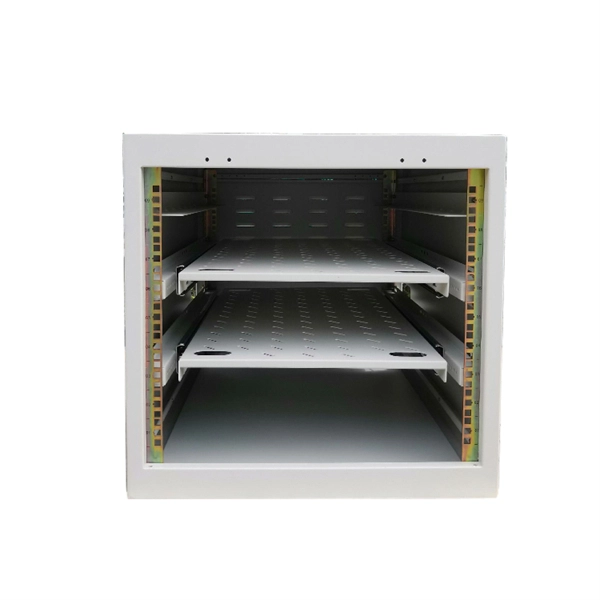
Proper network rack fixing involves careful planning, secure mounting, structured cable management, and adherence to airflow and accessibility standards.Planning and Preparation

Before fixing a network rack, assess the equipment and rack requirements. Determine the number of rack units (U) needed, considering switches, patch panels, UPS units, and other devices. Floor-standing racks typically offer 42U or more, while wall-mounted racks are shallower and suitable for smaller deployments . Verify rack depth to accommodate modern PoE++ switches (16–20") and ensure clearance for power cords and airflow . Plan for 30% extra U-space to allow future expansion .

Mounting the Rack
  • Floor-standing racks should be placed on stable, vibration-free surfaces. Anti-vibration mounts can protect sensitive equipment .
  • Wall-mounted racks require secure anchoring to studs or reinforced walls. Ensure the wall can support the weight of fully loaded equipment .
  • UPS placement is recommended at the bottom of the rack for stability and weight distribution .
Equipment Placement
  • Use a “sandwich” layout: Patch Panel → 1U Cable Manager → Switch. This ensures organized cabling and easy access .
  • Place high-power PoE++ switches with adequate spacing to prevent overheating. Consider thermal dissipation and active ventilation for Wi-Fi 7 or multi-gigabit devices .
  • Fiber or SFP+ uplinks should be positioned to minimize cable bends and maintain proper bend radius .
Cable Management
  • Use structured cable management with cable brackets, Velcro straps, and maneuvering panels to prevent kinks and maintain airflow .
  • Avoid tight bundling of PoE++ cables to reduce heat buildup; follow TSB-184-A standards for loose bundling .
  • Label both ends of each cable with unique IDs using latch cards or labeling systems for easier troubleshooting .
  • Maintain a 6-inch patch cable length for short connections and consistent routing .
Airflow and Cooling
  • Ensure front-to-back airflow by leaving space between devices and using perforated doors or blanking panels .
  • Monitor temperature and humidity to prevent overheating and condensation. In-row cooling or dedicated ventilation may be necessary for high-density racks .
Documentation and Compliance
  • Document all connections, patch panels, and cable flows digitally using software like Docusnap to meet standards such as DIN EN 50173 and EMC guidelines .
  • Proper documentation improves maintenance efficiency, reduces downtime, and ensures compliance with audits or certifications . By following these methods, a network rack can be securely fixed, efficiently organized, and maintained for optimal performance, safety, and scalability.
Network Rack Fixing

A Guide to Server Rack Cable Management for Fiber Network

A successful fiber network requires a well-built infrastructure based on a strong server rack cable management

Related Video Reference

This video was associated with the source search result. Verify technical details against current product documentation and project requirements.

Technical note

This reference is intended for preliminary ODN and passive infrastructure research. Topology, split ratio, box or cabinet capacity, closure rating, cable type, test limits and applicable standards must be verified for the specific project.

Still Have a Technical Question?

Use the inquiry form to describe an ODN network, passive component or distribution box question.

Start an Inquiry